2026年5月21日
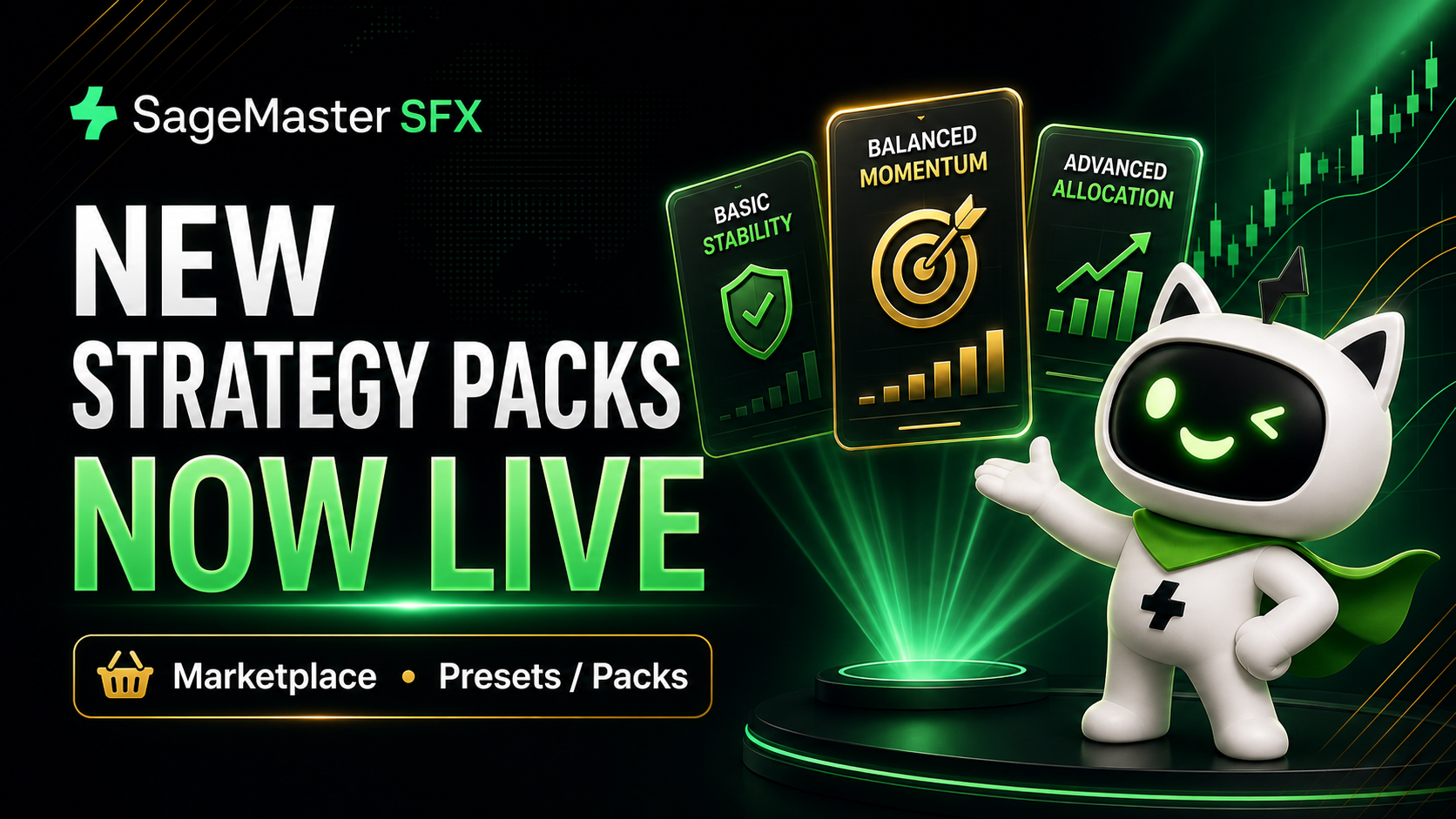
すでに以前のバージョンのパックを稼働している場合は、そのまま有効な状態で使い続けることもできますし、停止して Presets / Packs ページから更新版パックのいずれかを利用することもできます。今後のこれらのパックの更新も、現在のプリセットと同様に、既存の通知機能と同期機能を通じて利用できます。
現在利用可能な内容は以下のとおりです。
Basic Stability Pack は、複数のインジケーターをまたいで、より安定性重視の構成を求めるユーザー向けのパックです。GoldStrike、HyperNexus、PhantomPips を組み合わせており、新規ユーザー、小規模口座、より保守的な運用スタイルに適しています。
Balanced Momentum Pack は、複数のインジケーターをまたいで、より分散されたバランス重視のアプローチを求めるユーザー向けに設計されています。BlackPips、GoldStrike、XAU Dominus を組み合わせており、バランスの取れたリスク/リワード、適度なボラティリティ、保守的な構成より高い成長ポテンシャルを備えています。
Advanced Allocation Pack は、実績のあるインジケーターを使った、より高度な配分構成を求めるユーザー向けのパックです。Reynova と Melodytrade を組み合わせており、経験豊富なユーザー、より大きな口座、そして一貫性を重視しながらより高い成長ポテンシャルを求める方に適しています。
Marketplace で新しいパックを確認し、ご自身の口座規模とトレード方針に合った構成をお選びください。
SageMaster は、市場分析と教育的インサイトを提供する Software-as-a-Service(SaaS)ツールです。取引を執行したり、ブローカーサービスを提供したり、個別の金融アドバイスを行ったりするものではありません。すべての取引判断はユーザー自身が行うものであり、結果は保証されません。取引には、元本損失の可能性を含むリスクがあります。
2026年5月19日
🥇 AureliusPrime - GOLD
Preset: AureliusPrime - GOLD
マーケット構造、流動性ゾーン、CHoCH確認を活用した高確率XAUセットアップ。1:2〜1:4のRRRによるダイナミックなエントリーを狙います。
👻 PhantomPips - US30
Preset: Phantom - US30
モメンタムと流動性ゾーンを活用したUS30向けのイントラデイトレード戦略。TP分割、部分利確、ブレークイーブン管理を組み込んだ構造的アプローチ。
⚡ GoldStrike - GOLD
Preset: GoldStrike - GOLD
1:1 RRR戦略を採用した高速GOLDスキャルピング/デイトレード手法。積極的なトレード管理とBE保護を特徴とします。
🏛️ Luxor - GOLD
Preset: Luxor - Gold
ボラティリティの高い市場環境において、広めのSLゾーンとバランスの取れた1:1機会を活用した、規律あるリスク管理型GOLD戦略。
トレードにはリスクが伴い、結果は市場状況、ブローカーの約定品質、スプレッド、スリッページ、ならびに各口座設定によって異なる場合があります。
2026年5月7日
SageMasterは、市場分析と教育的なインサイトを提供するSoftware-as-a-Service(SaaS)ツールです。取引の執行、ブローカーサービスの提供、または個別の金融アドバイスは行いません。すべての取引判断はユーザーに委ねられており、結果は保証されません。取引には、資本を失う可能性を含むリスクがあります。
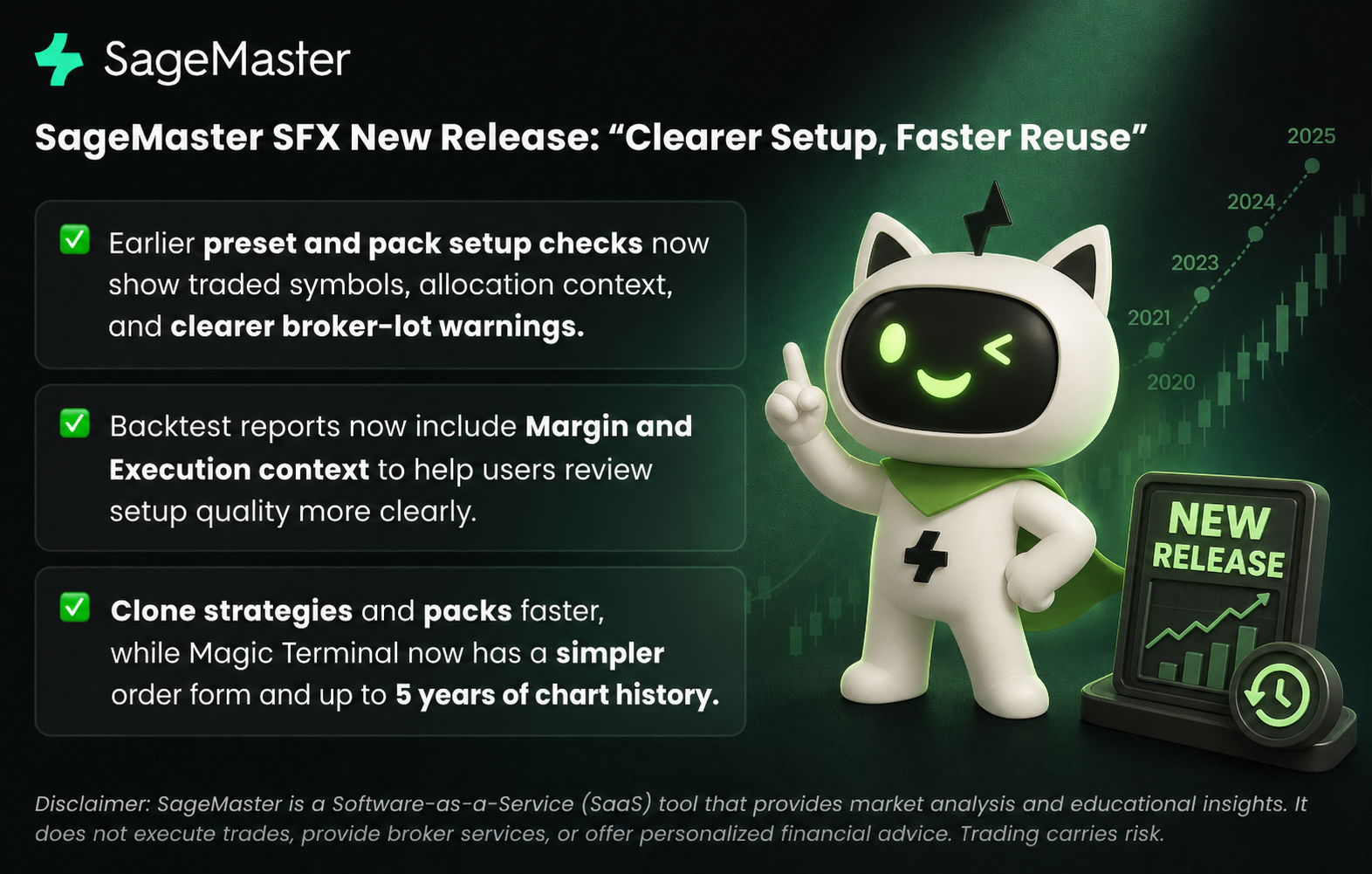
今回のリリースは、セットアップ時に摩擦が生じやすい場面に焦点を当てています。presetやpackを使用するとき、既存のセットアップを再利用するとき、そしてMagic Terminalで手動取引を管理するときです。より早い段階での検証、より明確な実行コンテキスト、そして既存の作業を新しいセットアップに引き継ぐためのよりシンプルな方法を利用できるようになりました。
1. presetとpack向けの早期セットアップチェック
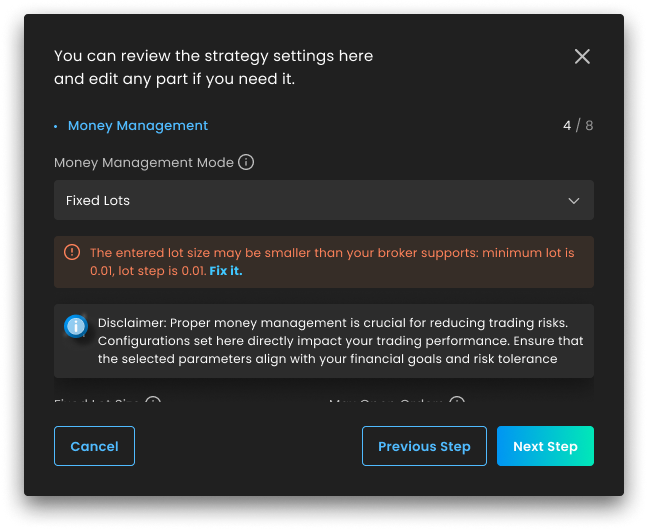
新機能: AI packをセットアップする場合やpresetを使用する場合に、SageMasterは取引対象シンボルと割り当てコンテキストをフローのより早い段階で表示するようになりました。また、固定ロットサイズがブローカーの最小ロットまたはロットステップ要件と一致しない場合も、より早く警告します。
重要な理由: 以前は、こうした不一致の一部は、アクティベーション後の失敗した取引やイベントログを通じて初めて発見されることがありました。シンボルのカバレッジ、割り当てコンテキスト、ブローカーロットの警告を早い段階で確認できることで、保存または起動する前にセットアップ内容をより明確に把握できます。
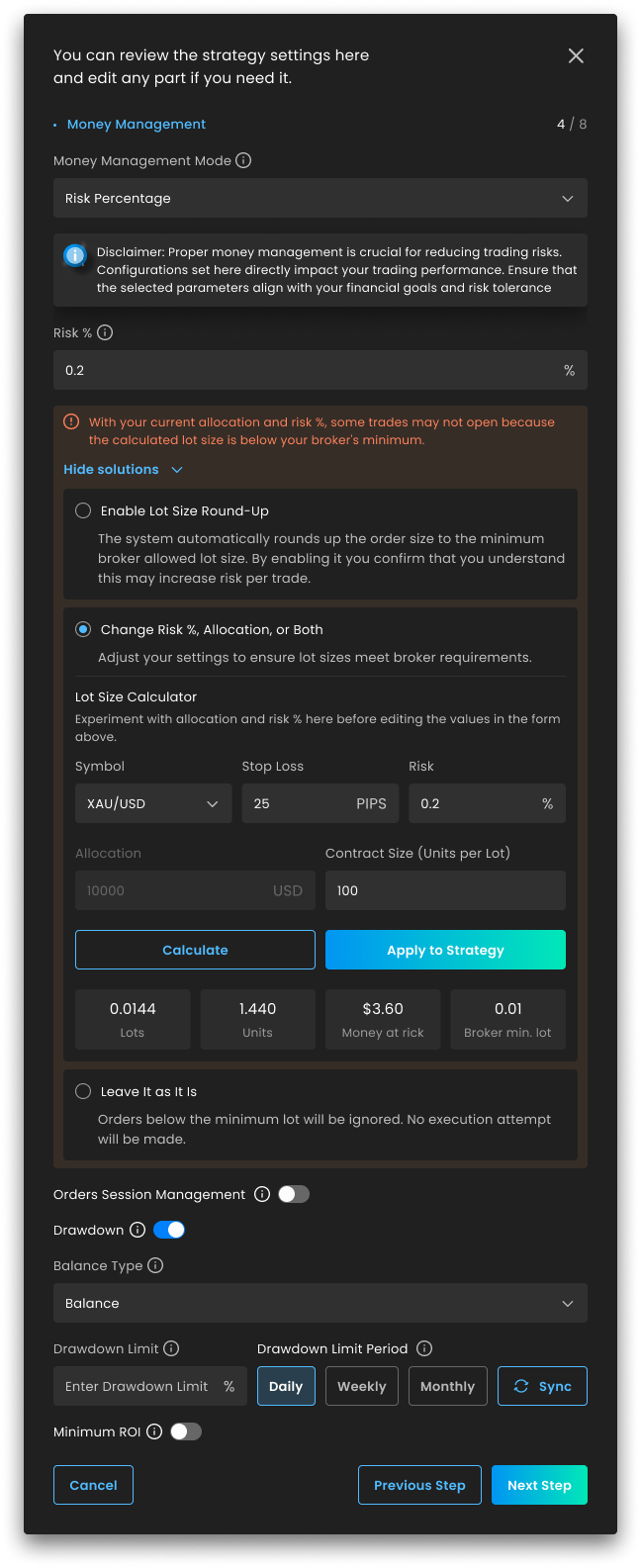
2. リスクベースのサイジングがブローカー制限に合わない可能性がある場合の視認性向上
新機能: リスクパーセント設定では、計算されたロットがブローカーの最小値を下回る可能性がある場合に気づきやすくなり、アクティベーション前に利用可能なセットアップ調整を確認しやすくなりました。また、更新したサイジング選択を戦略設定に保存する際にも、より明確なコンテキストが提供されます。
重要な理由: リスクベースのサイジングは、割り当て、stop loss距離、シンボルの挙動、ブローカー制約など、複数の変数に依存します。このフィードバックをセットアップフローに組み込むことで推測を減らし、ライブ実行が始まる前にそれらのトレードオフを確認しやすくなります。
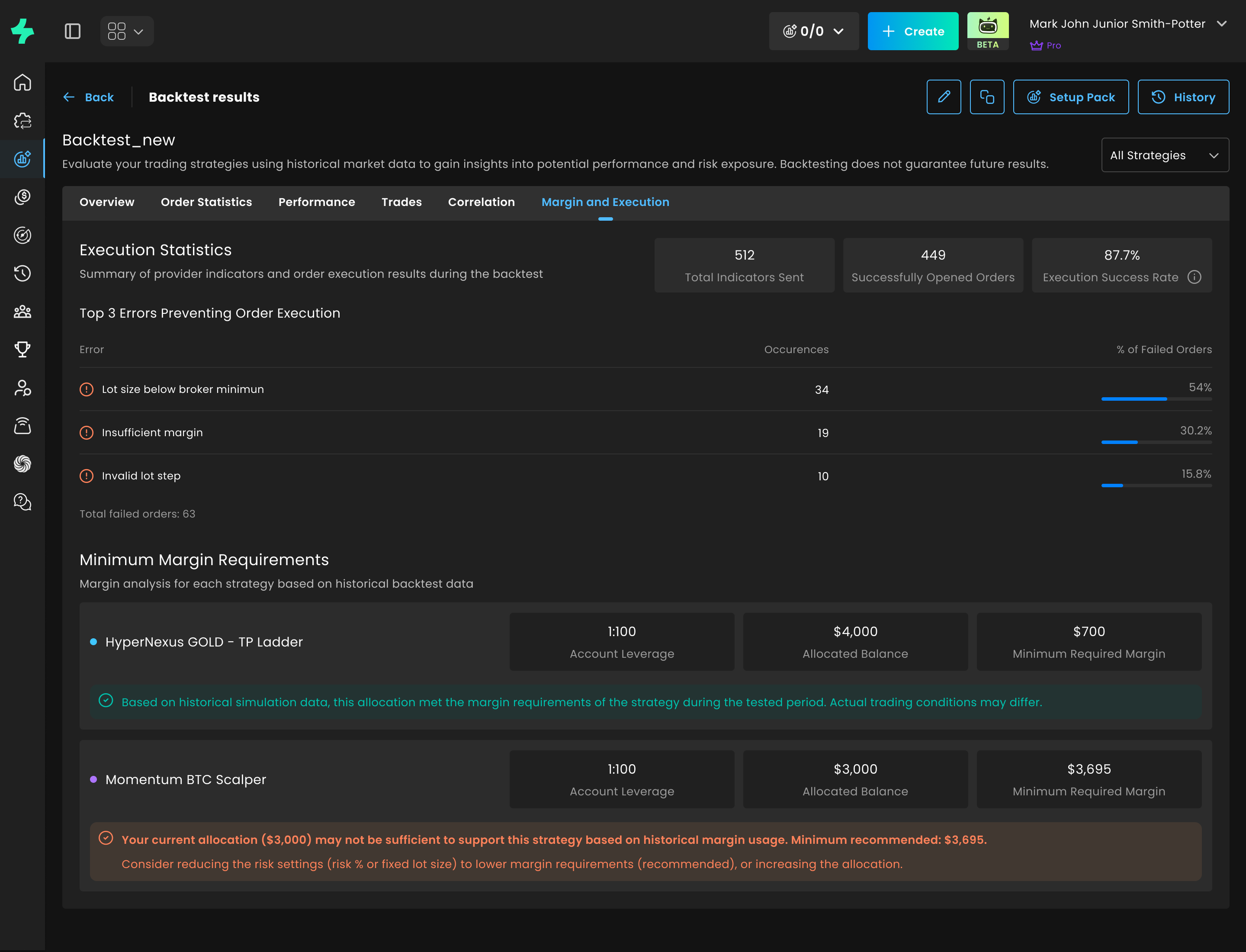
3. バックテストレポートにマージンと実行コンテキストを追加
新機能: バックテストレポートに、送信されたインジケーター総数、正常にオープンされた注文、実行成功率、主な実行エラー、過去の割り当て十分性コンテキストなど、実行に焦点を当てた統計を含むMargin and Executionセクションが追加されました。
重要な理由: これにより、弱い実行結果がセットアップ上の制限やマージン圧力によるものなのかをより明確に理解でき、戦略そのものだけを結果の唯一の変数として扱わずに済みます。
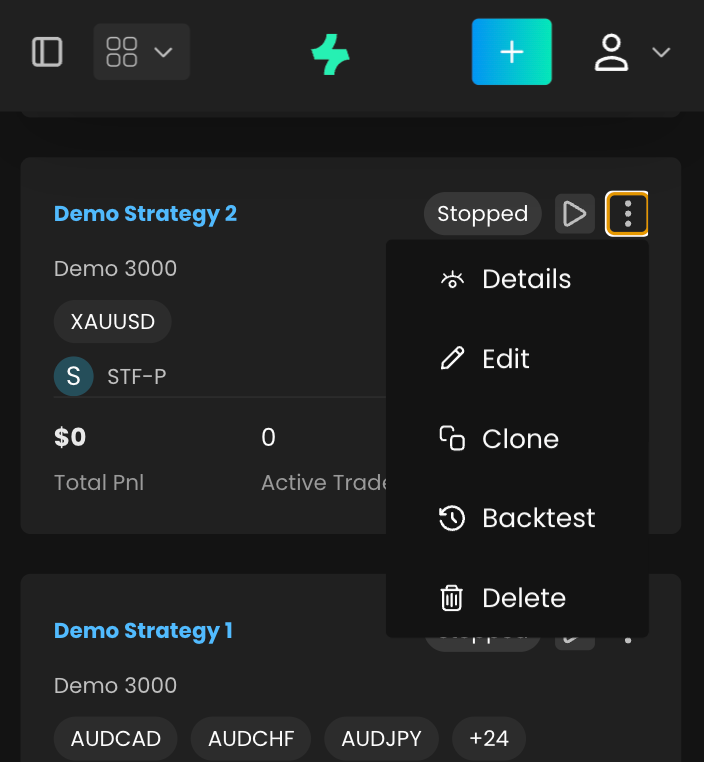
4. 戦略またはpackを新しいセットアップにクローン
新機能: ダッシュボードまたは戦略詳細ビューから既存の戦略をクローンし、元のセットアップが事前入力された状態でStrategy Creation Wizardを開けるようになりました。このリリースではstrategy packのクローンにも対応しているため、ユーザーは既存のセットアップを最初から作り直すことなく再利用できます。
重要な理由: 実績のあるセットアップを再利用するために必要な手動ステップが少なくなりました。ユーザーは既存の内容を出発点として、必要な変更を行い、すべての設定項目を再入力することなくより素早く起動できます。
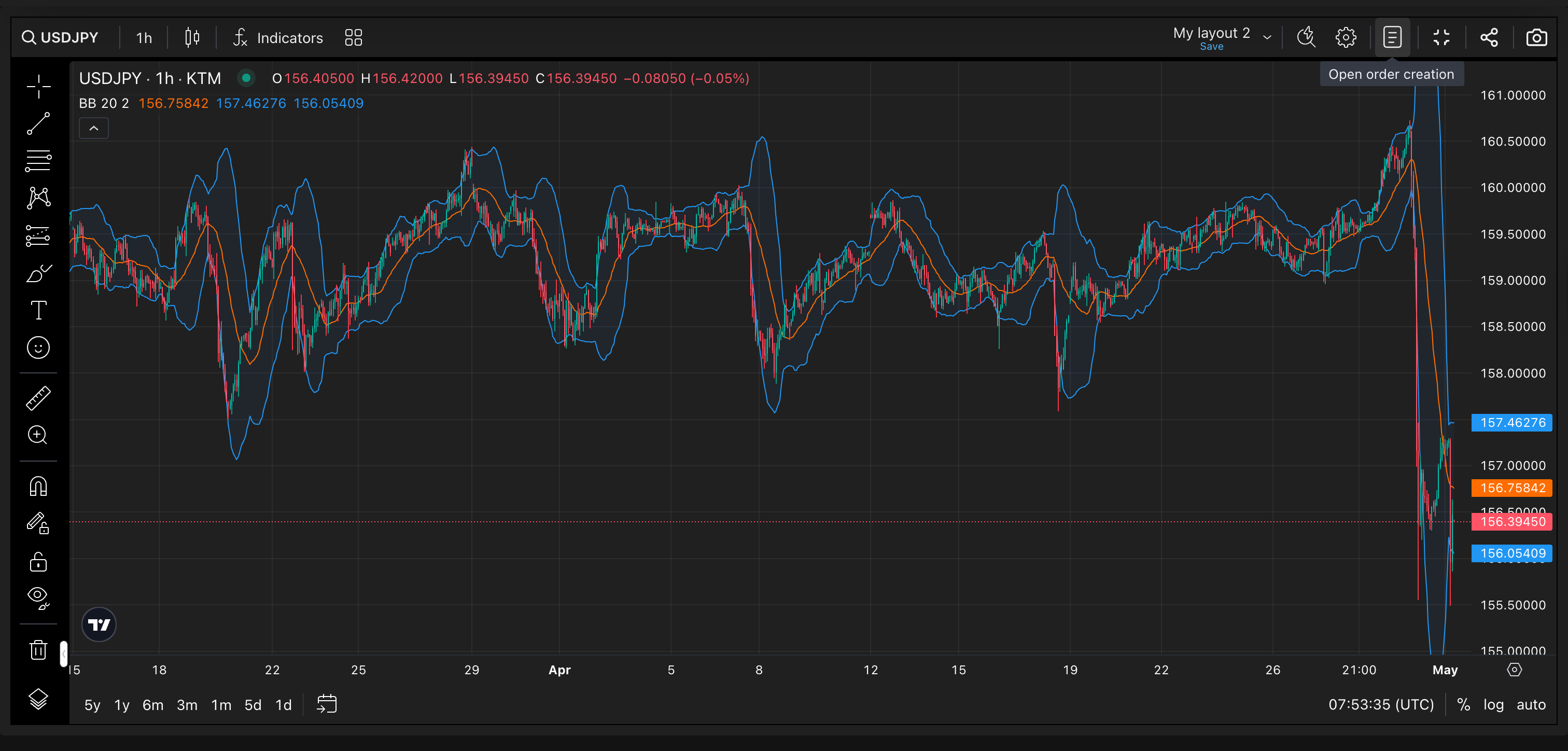
5. Magic Terminalのフルスクリーン制御を改善
新機能: Magic Terminalのフルスクリーンモードでは、注文作成フォームの開閉動作がより明確になり、現在のパネル状態を反映するtooltipの更新も含まれるようになりました。
重要な理由: 注文フォームが開いているかどうかを見失うことなく、チャートに集中した作業と注文入力操作を切り替えやすくなり、同時にチャート上で使えるスペースをより多く確保できます。
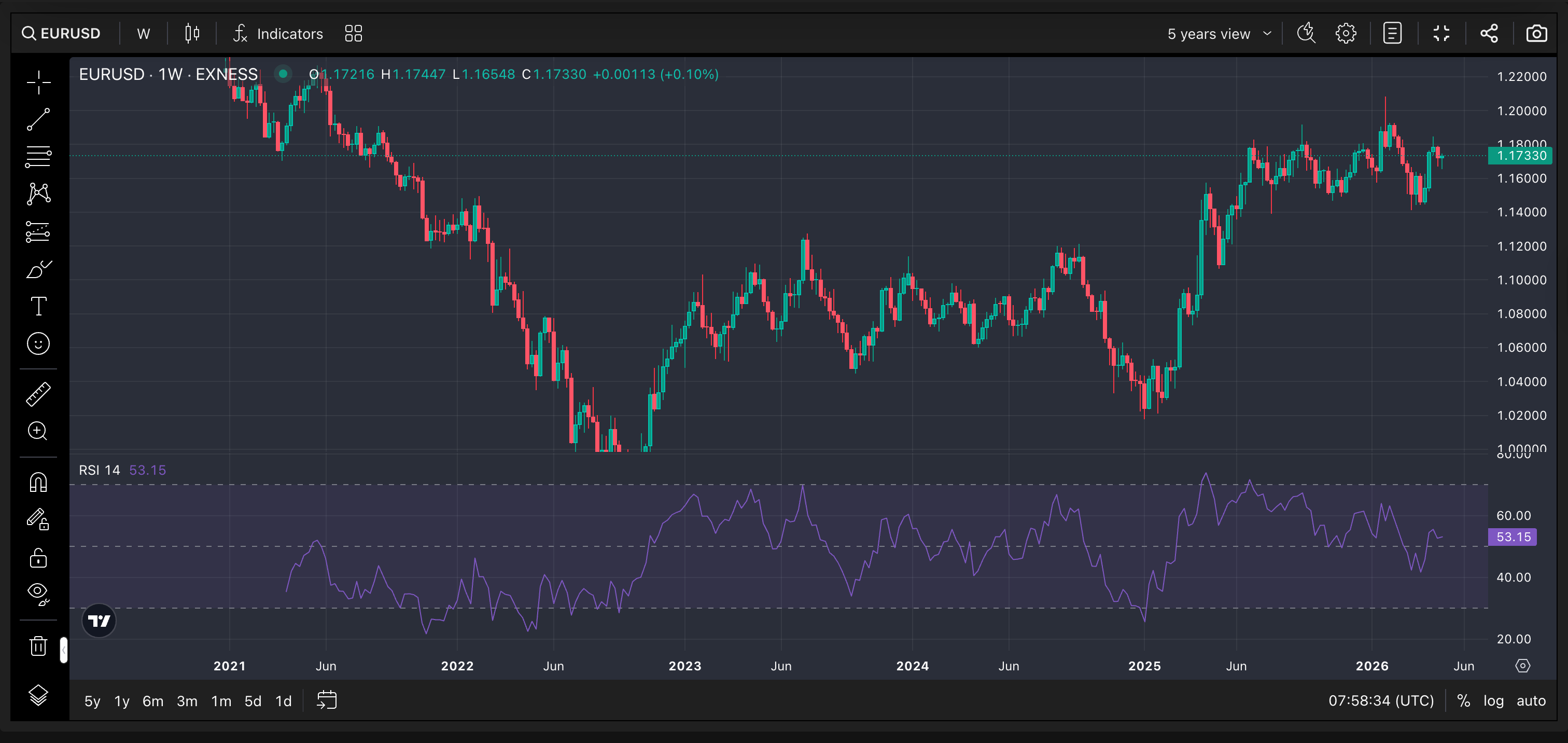
6. よりシンプルなMagic Terminal注文フォームとより深いチャート履歴
新機能: Magic Terminalの注文フォームは、より整理されたレイアウトと、手動取引向けのStop LossおよびTake Profitに関するより明確なガイダンスで簡素化されました。チャートでは、Magic Terminal内で直接確認できる最大5年分の過去データも利用できるようになりました。
重要な理由: 手動注文のセットアップが確認しやすくなり、ユーザーは取引ビューを離れることなく、より多くの過去の市場コンテキストをチャート上で利用できます。
7. Marketplaceで新しいproviderが利用可能に
新機能: 新しいproviderであるBlack PipsがMarketplaceに公開されました。Black PipsはForexのイントラデイトレードに特化しており、明確なセットアップルール、規律ある実行基準、定義されたリスク管理パラメーターを備えた、1:1のリスクリワード比に基づく構造化されたアプローチのpresetを提供します。
重要な理由: Black Pipsのpresetが自分の取引ワークフローに合う場合、Marketplaceから確認してアクティベートできるようになりました。いつものように、取引にはリスクが伴い、結果は市場環境、ブローカーの実行、スプレッド、スリッページ、個別のアカウント設定によって変動する可能性があります。
SFXをお選びいただきありがとうございます。最新機能をぜひご活用ください。今後のアップデートにもご期待ください。
2026年5月6日
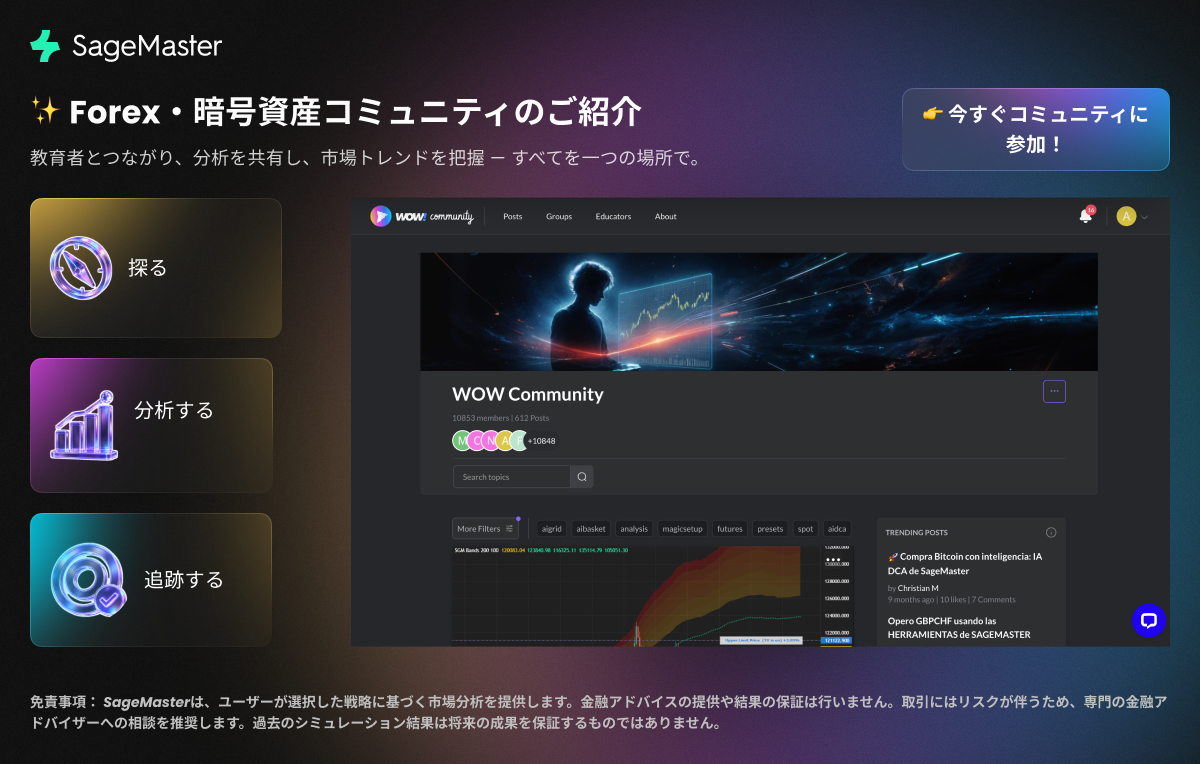
プラットフォーム内から直接、Forex・暗号資産コミュニティにアクセス可能になりました — これまで以上にスピーディーで便利にご利用いただけます。
💬 市場の最新情報
📊 他のユーザーから学ぶ
⚡ 分析
ぜひ参加して探索し、ご意見をお聞かせください!
https://sfx.sagemaster.io/wow-community
免責事項: SageMasterは、ユーザーが選択した戦略に基づく市場分析を提供します。金融アドバイスの提供や結果の保証は行いません。取引にはリスクが伴うため、専門の金融アドバイザーへの相談を推奨します。過去のシミュレーション結果は将来の成果を保証するものではありません。
2026年4月13日
SageMaster is a Software-as-a-Service (SaaS) tool that provides market analysis and educational insights. It does not execute trades, provide broker services, or offer personalized financial advice. All trading decisions remain with the user, and outcomes are not guaranteed. Trading carries risk, including the potential loss of capital.
This update gives you more flexibility in how you build, adjust, and manage your strategy combinations. Whether you start from an admin-curated preset or set up your own, you now get clearer controls, better visibility into allocation, and more context before you activate anything.
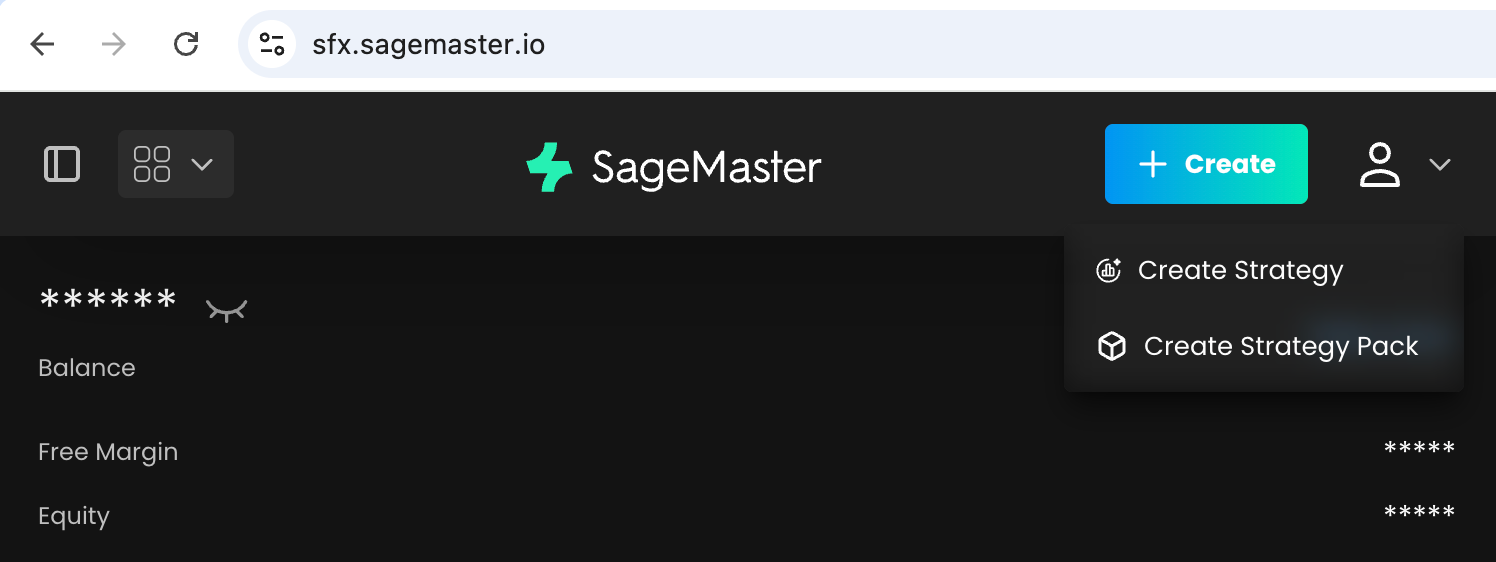
1. Build your own packs and adjust existing ones
What's new: You can now create your own Strategy Packs with a custom name, description, broker account selection, allocation setup, strategy selection, draft saving, activation, and backtesting. You can also edit both your own packs and those started from admin-curated presets.
Why it matters: You have more freedom to organize strategies around your own setup instead of working around a fixed structure.
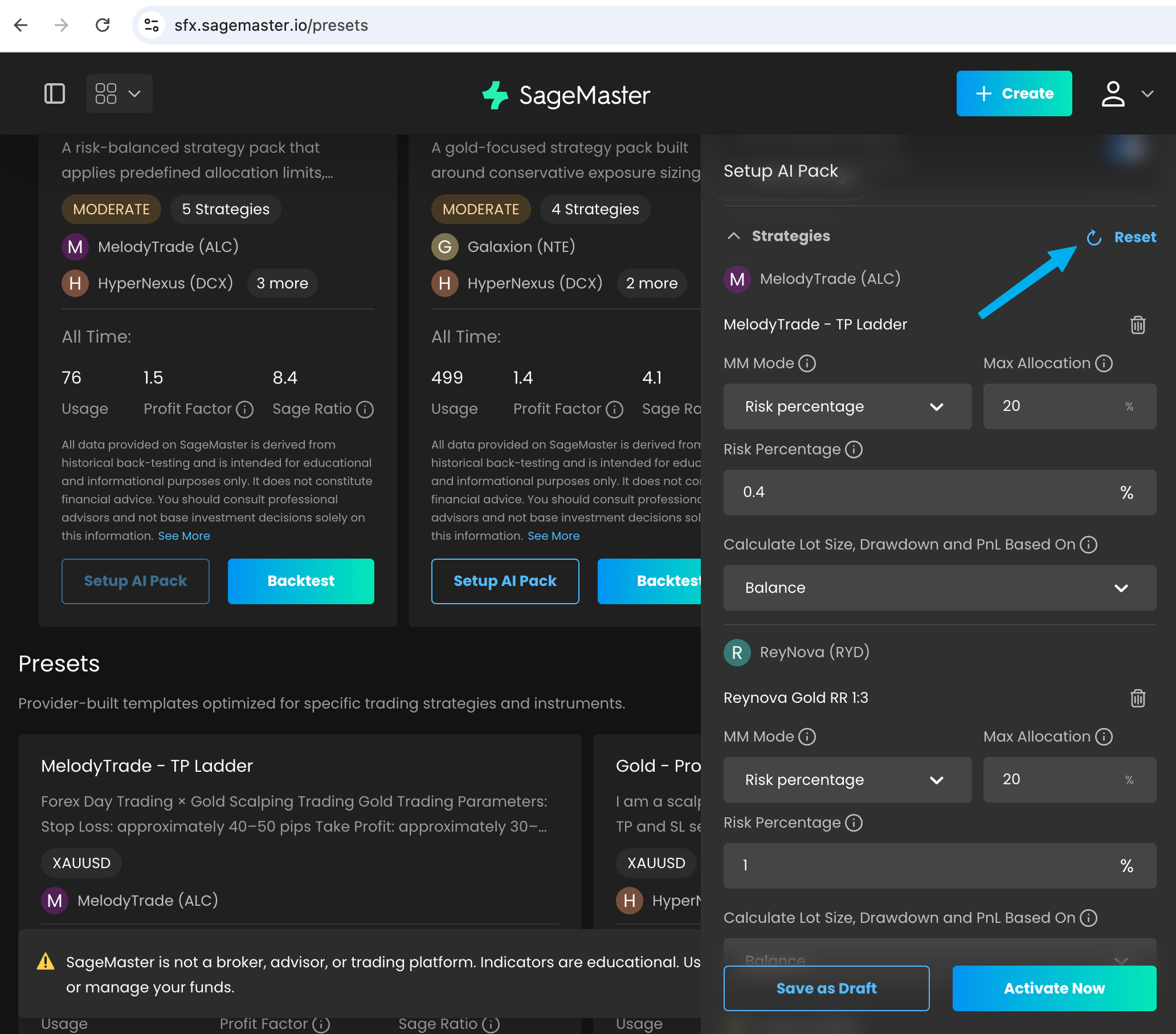
2. More freedom when you start from an admin-curated preset
What's new: If you start from an admin-curated preset on the Presets page, you can now remove strategies, add new ones, and use Restore to return to the original preset setup.
Why it matters: You can explore different combinations without losing the original version you started from.
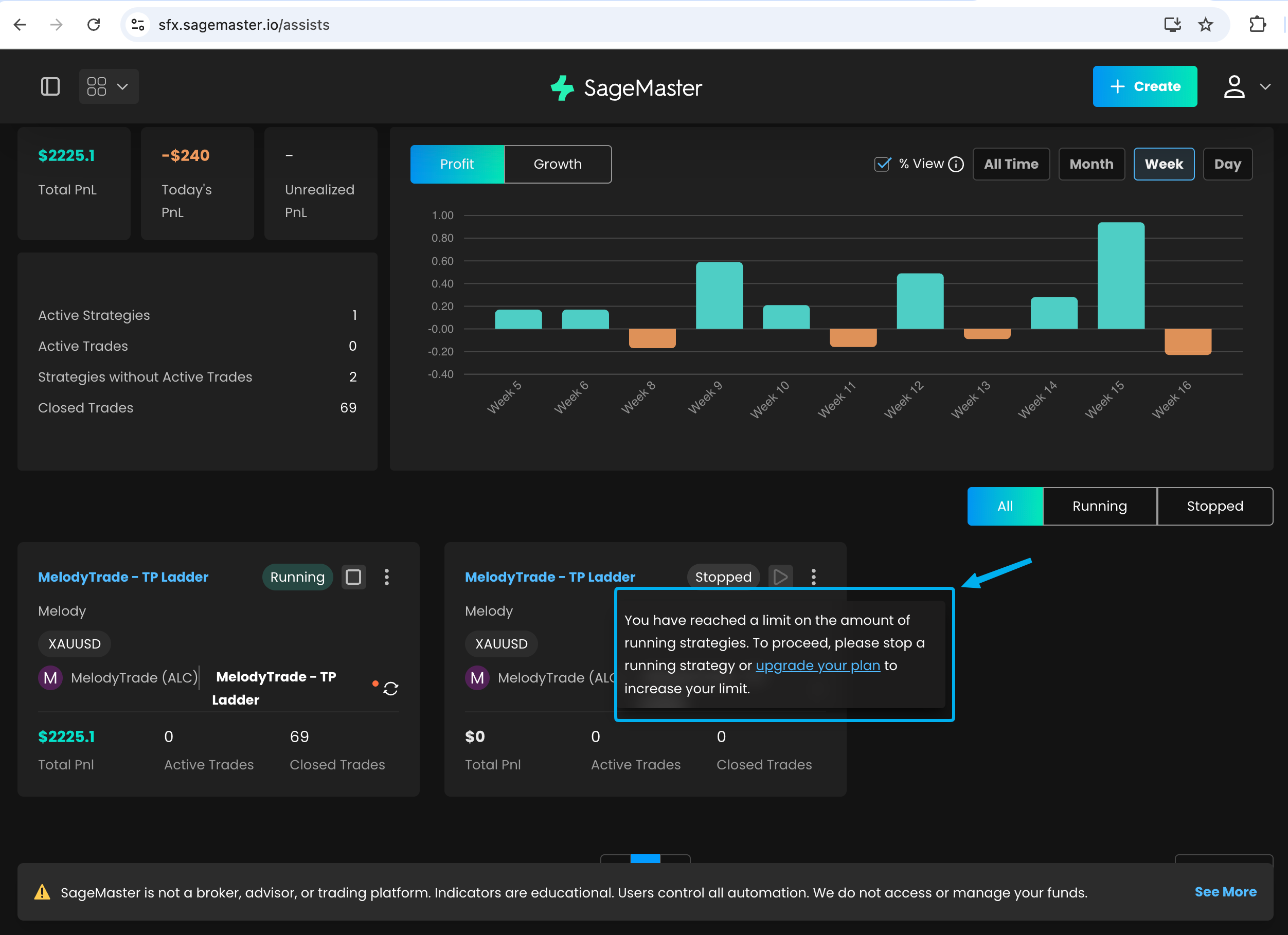
3. Clearer limits before you try to run a pack
What's new: Strategies inside a pack are now counted toward your total running strategy limit. If starting a pack would take you beyond your available slots, you'll now see a clearer system notification.
Why it matters: You can understand sooner how your current subscription affects what you can run, and plan your active strategies more easily.
4. Better visibility into allocation and strategy status
What's new: You can now see the available balance for the selected broker account when you start from an admin-curated preset or create your own pack. We also improved status visibility so when a pack is stopped, the strategies inside it show that they are not running in that pack.
Why it matters: It's easier to line up allocation with the funds available in your account and understand why included strategies are inactive.
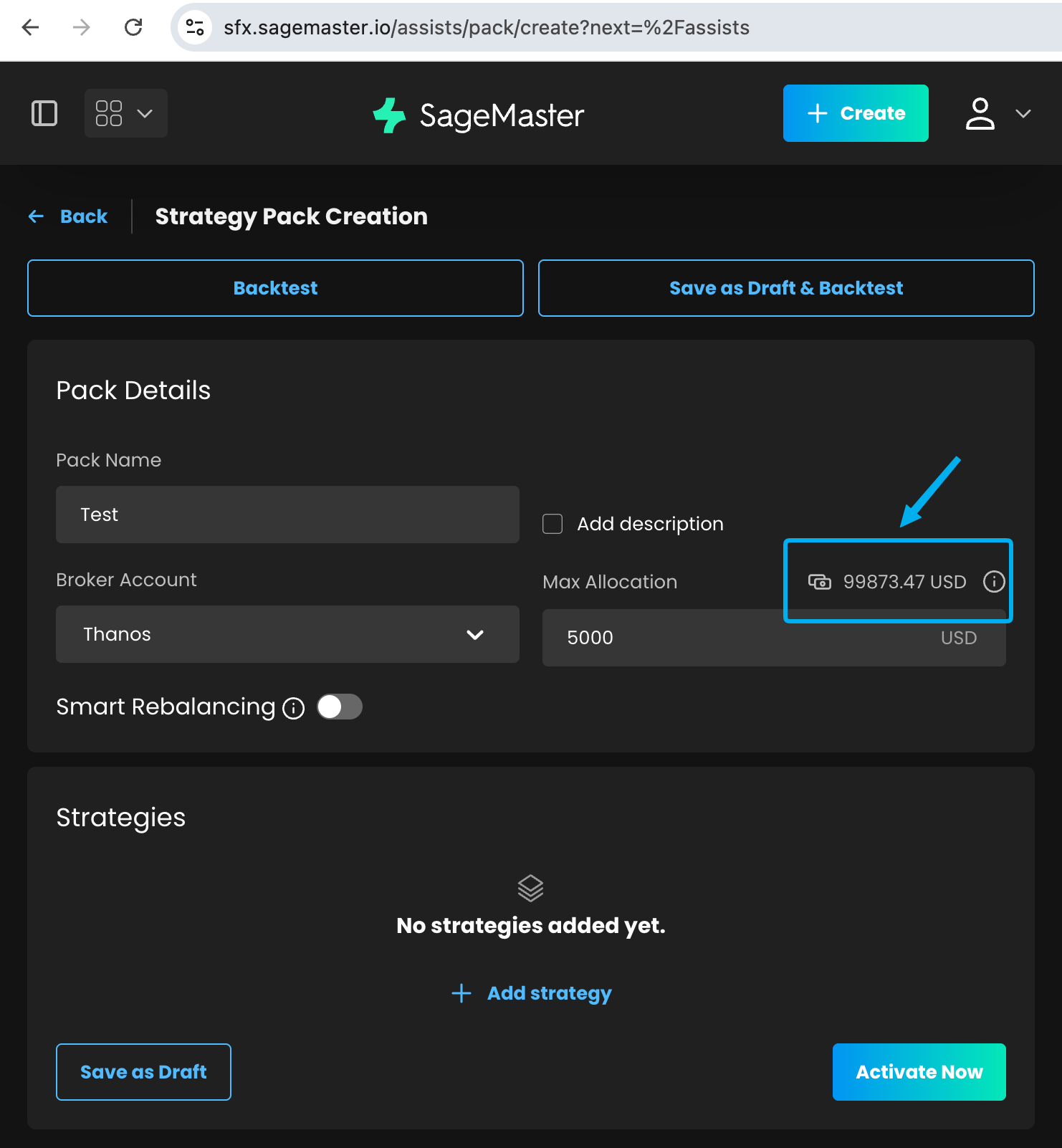
5. Your broker account stays fixed after strategy creation
What's new: Once you create a strategy, its connected broker account can no longer be changed. You still choose the broker account during setup, but after that the connection stays fixed.
Why it matters: This makes your setup more predictable and avoids confusion later if you revisit or reuse a strategy.
What's Next
We're already working on the next set of improvements, including stronger setup validation for presets and packs, a dedicated way to clone a strategy into a new setup, the ability to start a pack directly from a backtest result, and more Magic Terminal usability improvements, including full-screen behavior and a simpler order form.
Read more:
Improved Setup Checks for Presets and Packs
Clone a Strategy Into a New Setup
Start a Pack From Backtest Results
Better Full-Screen Trading in Magic Terminal
A Simpler Magic Terminal Order Form
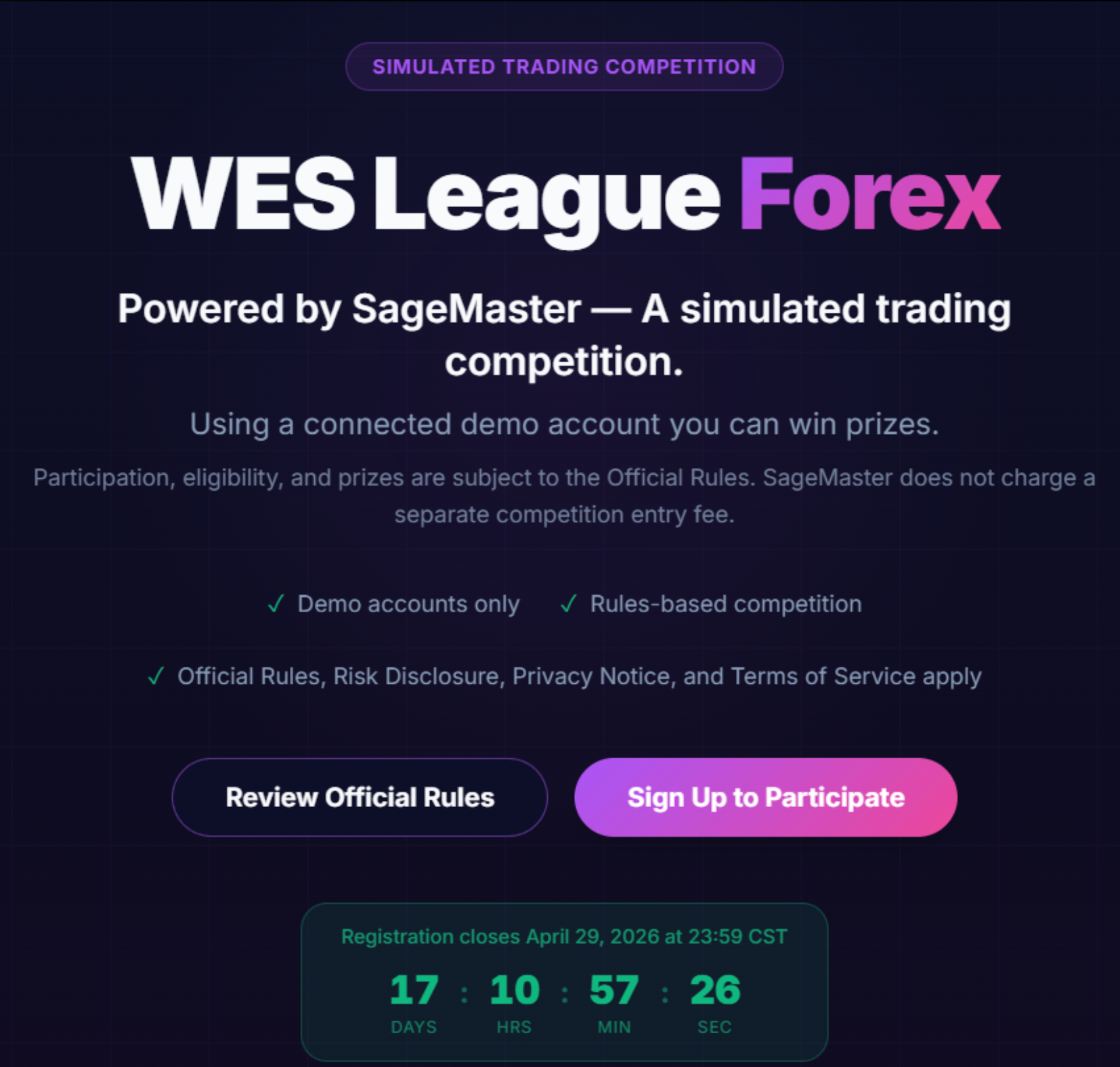
WES League registration is now open
Registration for the WES League Forex is now open. This official trading challenge powered by SageMaster starts on April 29 and is run on demo accounts, with rankings based on performance, consistency, and risk management.
Before you join, please review the rules carefully: https://www.notion.so/1billion/Wes-League-Rules-Condistions-33eae3f74f4e8031a11de0215b18555d?source=copy_link
You can secure your spot here: https://league.sagemaster.com/
Thank you for choosing SFX! Enjoy our latest features and stay tuned for more updates.
2026年4月7日
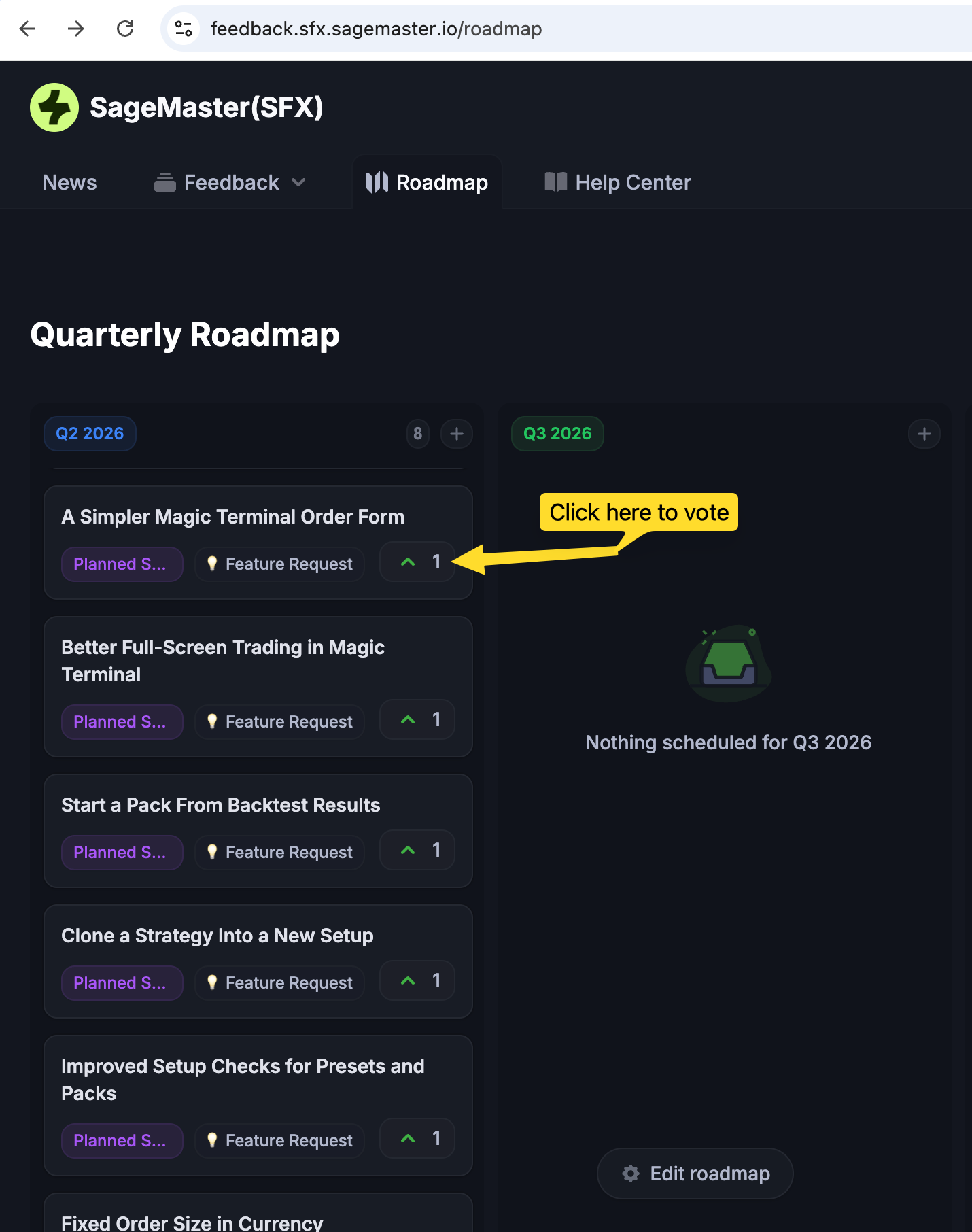
We’ve just added several upcoming features to our roadmap, and we’d love your input on what should come sooner.
If there’s something you’d like to see faster, please open the roadmap board and vote for the items that matter most to you:
https://feedback.sfx.sagemaster.io/roadmap
To vote:
Open the roadmap item and click the vote icon in the top right corner, next to the number and arrow.
2026年4月2日
これまでで最も安定したプロバイダーの一つが、再び利用可能になりました。Oblivion の戦略は以下を基盤としています:
構造化された実行
強力なリスク管理
一貫したパフォーマンス志向
プリセットを有効化し、あなたの戦略に直接接続できるようになりました。
📊 より規律あるルールベースのアプローチを求めるユーザー向けに設計されています。
⚠️ 必ずご自身のリスクに合わせて設定を調整し、実行前に内容を確認してください。
2026年3月9日
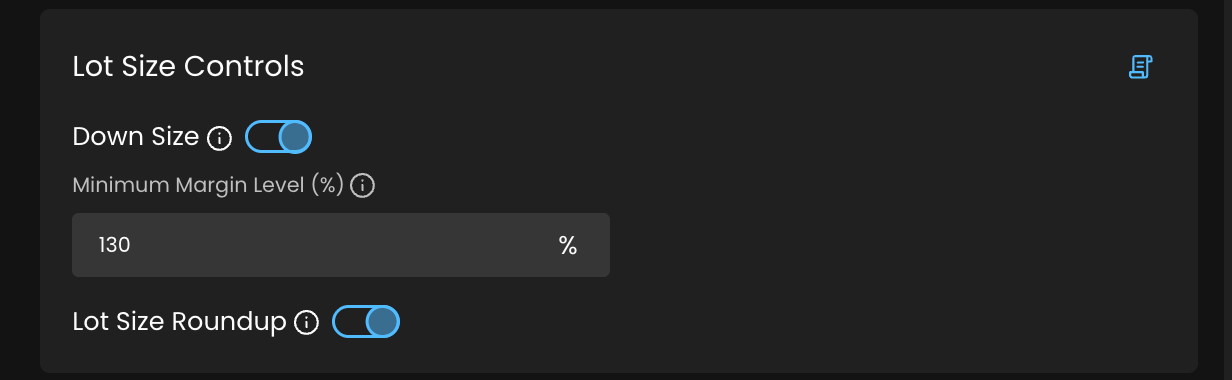
SageMasterのForex戦略において、より高い柔軟性とエラー防止を実現する新しいロットサイズ管理機能を追加したことをお知らせします。
新機能
Down Size
証拠金要件および最低証拠金レベルを満たすように注文ポジションサイズを自動調整し、資金不足によるエラーを防ぎます。
ロットサイズの切り上げ
計算されたロットサイズがブローカーの最低要件を下回る場合、ポジションサイズを引き上げて要件を満たします。特に、リスク割合ベースの資金管理を使用する場合に役立ちます。
これらの機能により、ブローカーの制限に直面した場合でも、手動操作なしで戦略をスムーズに実行できます。
免責事項: SageMasterは市場分析および教育的インサイトを提供するSoftware-as-a-Service(SaaS)ツールです。取引の実行、ブローカーサービスの提供、または個別の金融アドバイスは行いません。すべての取引判断はユーザーの責任で行われ、結果は保証されません。トレーディングにはリスクが伴い、資本損失の可能性があります。
2026年2月24日
FX のペアを延々とスキャンするのはもう終わりです。SFX Screener は preset に合う通貨ペアを短いリストに絞り込み、実行前に Playbook で何を検証すべきかを明確にします。
使い方:
絞り込み:注目すべきペアを短いリストに(売買シグナルではありません)
検証:Playbook を使って確認(Screener info(ⓘ) を開くと checklist と「良い状態」が分かります)
実行:Magic Terminal のチャートで確認(構造 + トリガー + 無効化水準)し、明確なリスクプランがある場合のみ実行
✨ うれしいポイント:
ブラックボックスではありません — Playbook が「なぜ候補になったか」を説明します
labels + tooltips でスキャンが速い
チャートを見る時間を “本命候補” だけに使えます
🚀 使ってみる:
SageMaster ダッシュボード → SFX Screener を開く
Preset を選ぶ(Trend Continuation / Oversold Rebound / Volatility Expansion / Helix Pattern Validation)
テーブルをスキャンし、Screener info(ⓘ) を開いて Playbook を確認
Magic Terminal でチャートを開き、無効化水準を決めて「計画があるときだけ」実行する
📘 詳しくはこちら → User guide
免責事項:Sagemaster はソフトウェアプラットフォームとして、ユーザーが選択した戦略に基づく市場インサイトを提供します。金融アドバイスを提供するものではなく、結果を保証しません。取引にはリスクが伴うため、ユーザーは金融の専門家に相談することを推奨します。
2026年1月15日
SageMaster マーケットプレイスに 2 つの新しいプロバイダー が追加され、トレーディングコミュニティ向けの戦略の幅がさらに広がりました。
MelodyTrade (ALC)
FX デイトレード × ゴールド・スキャルピング
MelodyTrade は、テクニカル分析 を基盤とし、高い勝率と規律あるリスク管理 に明確に焦点を当てた戦略です。長年の FX デイトレード経験を背景に、特に ゴールド(XAUUSD) に重点を置いて進化してきました。
主なアプローチ:
マーケット構造およびプライスアクション分析
短期スキャルピングのための精密なエントリータイミング
厳格なリスク管理による一貫した執行
利用可能なプリセット:
MelodyTrade – TP Ladder
Thanos (HVN)
ゴールド & EURUSD × 固定リスクリワードの極致
「私たちはトレードする二人の兄弟 —— そして、我々は不可避だ。」
Thanos は ゴールド(XAUUSD) と EURUSD のみに特化し、限られた銘柄を極めることこそが安定性への鍵であると考えています。戦略は 厳格なリスクリワードルール に基づいており、通常 RR 1:2 または 1:3 を採用し、安定した月次成長を目指します。
主な特徴:
ゴールドのターゲット:100~200 pips
ストップロス:50~100 pips
オーバートレードを避ける規律あるマインドセット
利用可能なプリセット:
Thanos – GOLD – RR 1:2
免責事項
SageMaster は、市場分析ツールおよび教育的インサイトを提供する Software-as-a-Service(SaaS)プラットフォームです。取引の執行、ブローカー業務、または個別の金融アドバイスは行いません。トレーディングにはリスクが伴い、過去の実績が将来の成果を保証するものではありません。