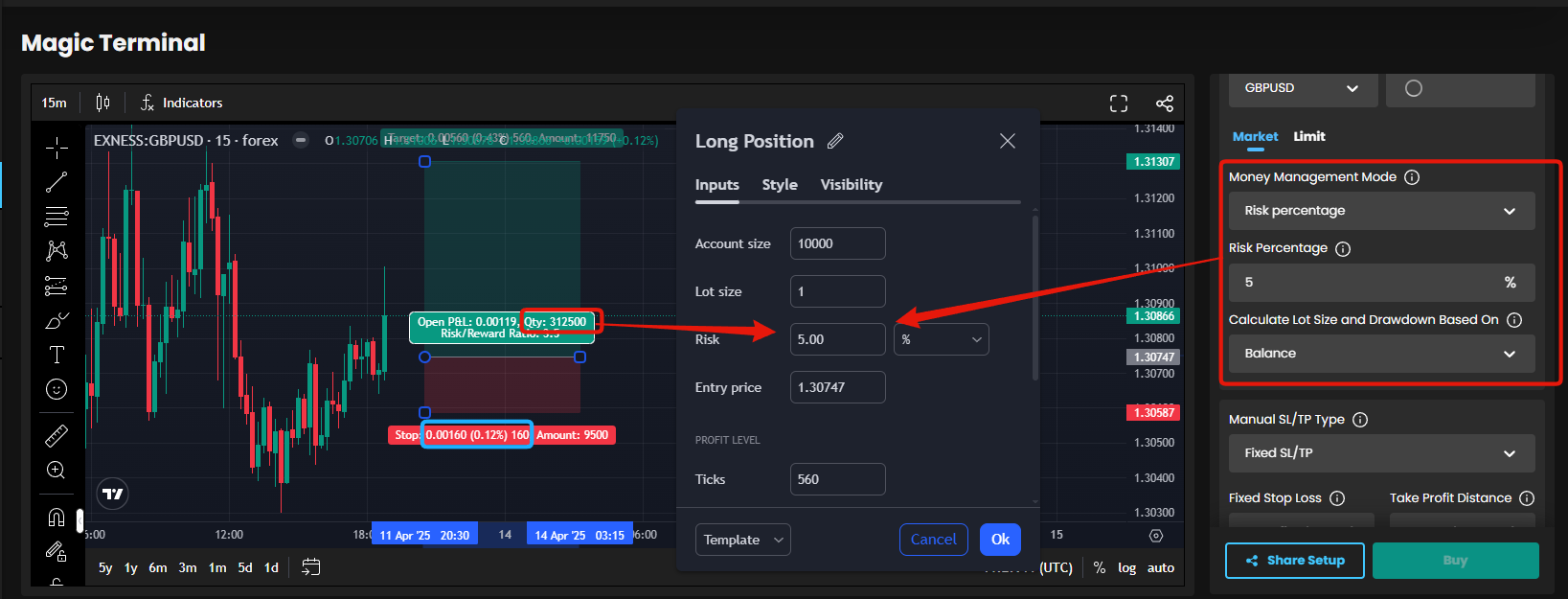
Magic Terminal Long/short Position Tools, Entry, SL, TP % Risk % is automatically written inside Magic Terminal Trade Panel
If the Long/Short Position tool was conencted to the Magic Terminal. And when somone opens up or share a trade setup, on Magic terminal.
And they drag out their Long/short posisiton tool. And place it where they want to enter. Then the Long/short posistons tools SL, Entry and TP is then connected to the Magic Terminal.
So people dont have to write the actual entry price, SL price, TP price, or the Risk % in the magic terminal at all.
They only place the Long Short posistion tool, on Magic Terminal, where they want to enter. And open the Settings for the Long/short position tool and write Risk %.
And then that information is sent to the magic terminal. and the customer
click Buy/Sell and a order is placed.
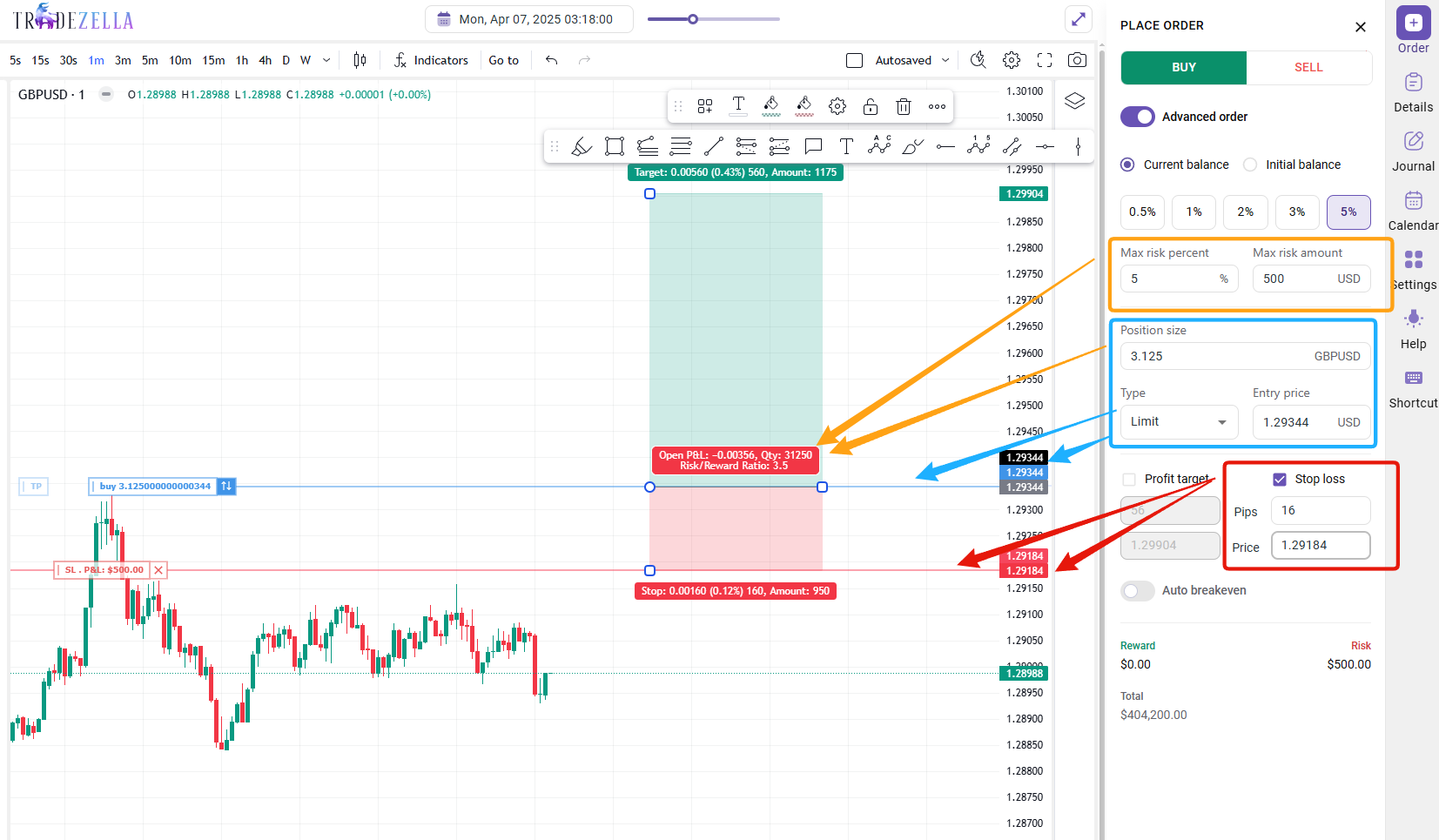
That is exactly how it works, on another Trading Tool I use. TradeZella.com
Just put your Long/Short position Tool. And then all the Entry Price, SL, TP is input into the Trade Panel on the Side, in this case. This would be the Magic Terminal Panel.
Cause the Long/short position tool. Currently on tradingView, will dispaly the corect lotsize. if used correctly. so if that information is sent to the magic terminal. Then people only need to put up the long/short position tool, write Risk %. And click Buy/sell.
The main problem for me, especially when it comes to market execution. is you need to write in your SL, your TP, and your entry price. And figure Write Risk %. That takes time. You dont have time to write all that information, you just have to Write Risk % and enter.
While spending time on writing the SL, TP, Entry price and TP, price could have moved. and you got a bad Entry. and the risk-to-reward might not be so good. Especially when trading fast moving and volatile pairs like Gold or Indices.
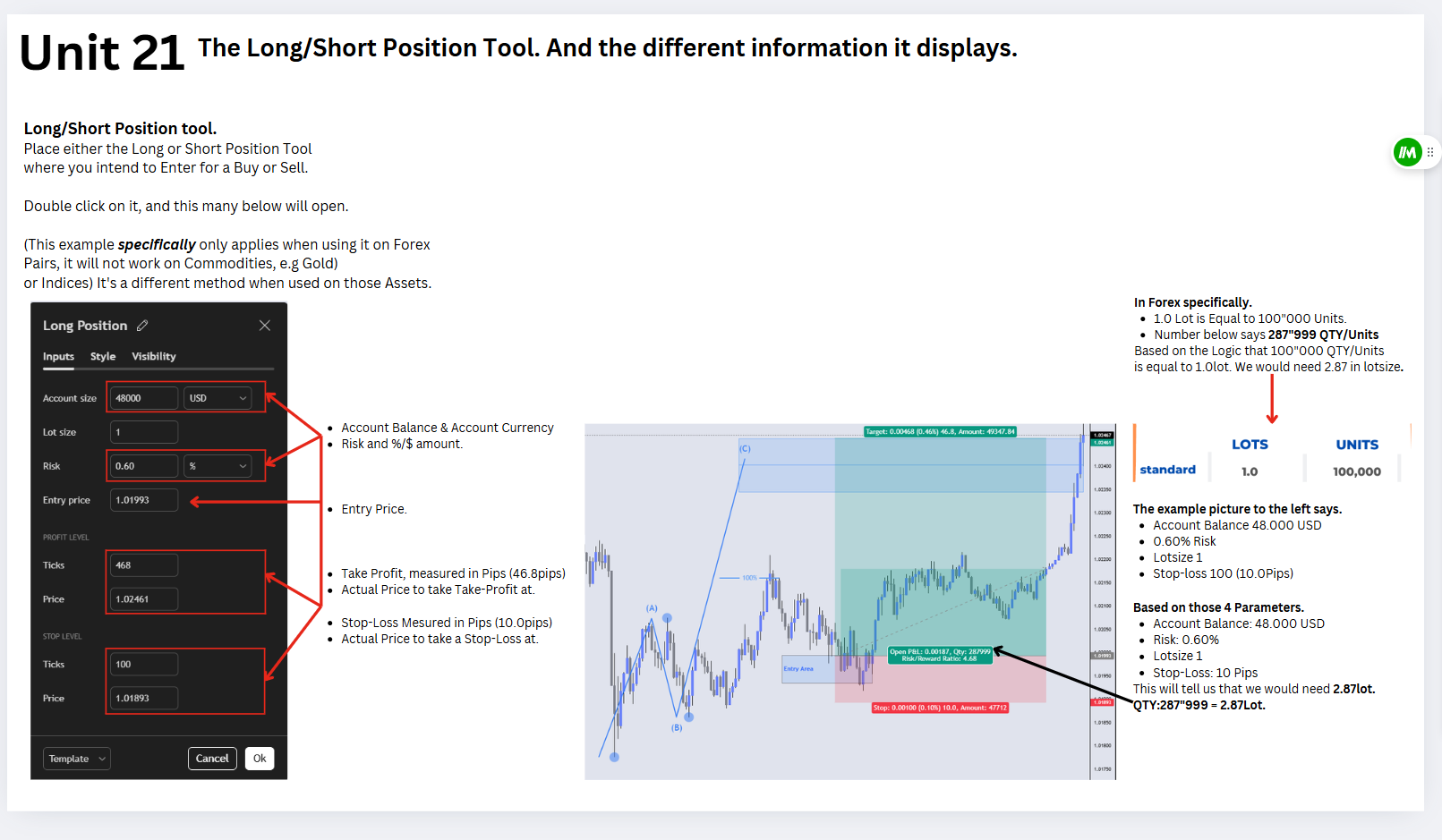
https://www.mql5.com/en/market/product/23415?source=Site+Market+Main+Rating006
I use this tool on my MT5, that has a built-in long/short position tool like i am talking about here.
I just write % Risk, and i click buy/sell. and i am in the trade.
So customers can just make Long/short position tool with various Templates, with various SL and TP"S.
So when you then click on on 1 of the templates, that SL, Entry and TP. And the Risk % (from the long/short posistion tool) is sent to the magic terminal.
And you can then click buy/sell and you are In the trade.
This is exactly how i execute all market executions. With Trade Assistant tool, on my MT5.
https://www.mql5.com/en/market/product/23415?source=Site+Market+Main+Rating006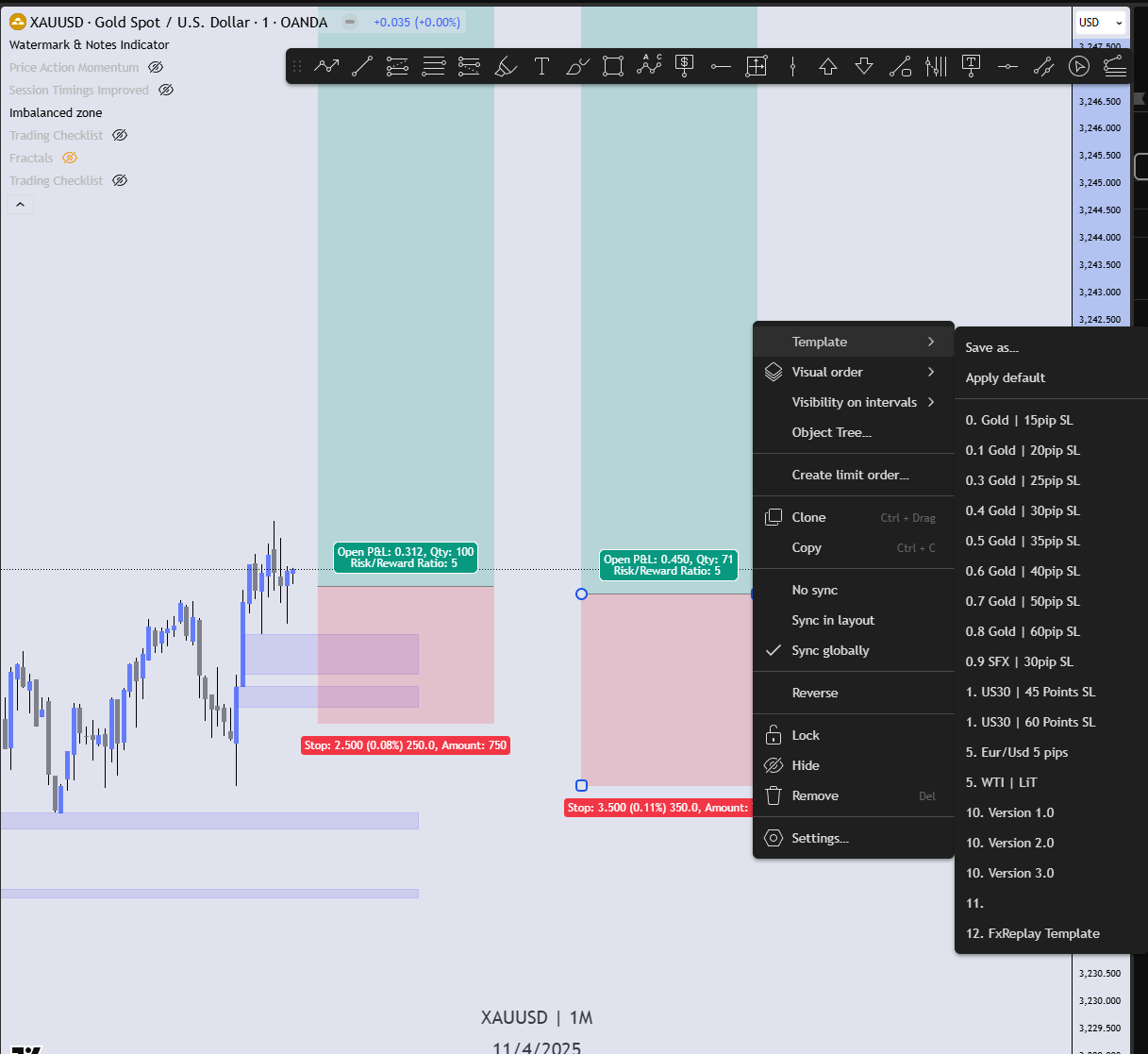
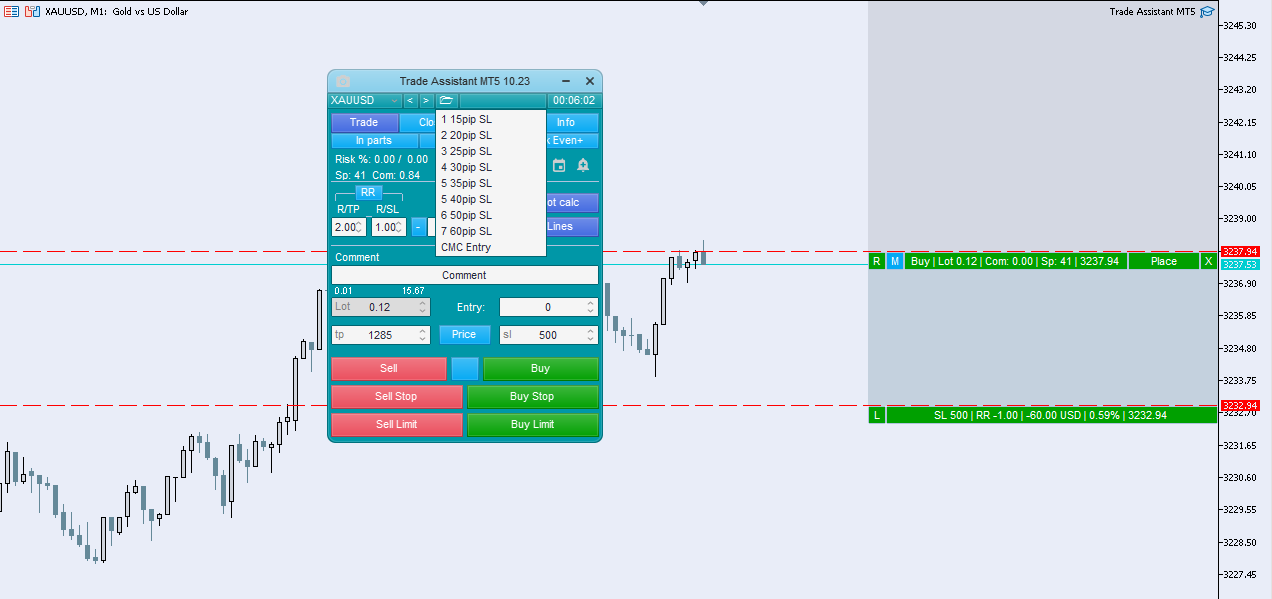
If the Magic Terminal were to become like this.
Then any customer using the Helix, or Magic Terminal can just
Take out the Long/Short Position Tool, put it where they want to enter.
Select % Risk,
Click Buy/Sell.
(3 Actions) And the order is placed. Either Market Order/or Pending Order.
When doing especially Market Execution, there is absolutely no time to waste.
By wasting time on Writing Entry Prie, SL Price, TP Price and Risk %. Price could have moved very far. And you got a bad Entry, or your SL is placed a bad place.This also allows for the Lotsize to automatically be calculated correct, you can just drag SL up or Down. And the amount of pips in SL becomes Higher/Lower. And the Lotsize is automatically adjusted according to % Risk. And amount of pips in SL.
(If you put the Long/Short Position Tool. Not on the Current Price, but away from it. Then a Pending Order is created, instead of a Market Execution Order)
Here is a video, where I demonstrate how all of this works:
Please authenticate to join the conversation.
Added to Backlog
Feature Request
High Priority
About 1 year ago

Ingvar Jansrud
Subscribe to post
Get notified by email when there are changes.
Added to Backlog
Feature Request
High Priority
About 1 year ago
Ingvar Jansrud
Subscribe to post
Get notified by email when there are changes.